Vector Neon Creator Editable Effect: Instant Glow
If you have ever walked through a city at night, you know the magnetic pull of a neon sign. It isn't just light; it is atmosphere. It is immediate recognition. For designers, marketers, and content creators, capturing that specific electric aesthetic usually requires hours of complex layering in Photoshop or expensive 3D software. But what if you could skip the technical headache entirely? The Vector Neon Creator Editable Effect is a specialized design asset built to bridge the gap between a flat vector idea and a glowing, high-impact neon reality.
This isn't just a static image overlay. It is a comprehensive mockup system designed specifically for Adobe Illustrator. Whether you are crafting a logo for a client, designing social media graphics for a new product launch, or creating signage for an event, this tool allows you to transform standard typography and shapes into realistic neon tubes. The appeal here is versatility combined with ease of use. You don't need to be a lighting technician to make your designs shine; you just need to type your text and apply the effect.
The Anatomy of the Glow: Visual Style and Characteristics
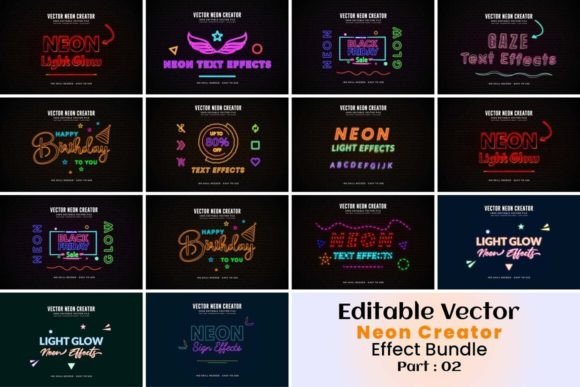
The visual personality of the Vector Neon Creator Editable Effect is defined by its authenticity. Generic glow effects often look flat or muddy, failing to capture the physics of gas-discharge lighting. This effect, however, simulates the specific behavior of neon tubes. You get the bright, hot center of the glass tube, the soft bloom of the light diffusion, and the subtle ambient glow that casts onto the background. It creates a sense of depth that makes the text feel like it is physically mounted on the wall, rather than just printed on the paper.
One of the most practical features of this package is the inclusion of 11 different EPS files. Why does this matter? Because neon signs look different depending on their environment. A pink neon sign looks vibrant against a dark brick wall but might get lost on a white background. By offering multiple color options and a transparent background, this asset allows you to adapt the effect to any context. You can place your glowing text over a photograph of a storefront, a solid brand color, or a textured digital background without worrying about masking issues or color clashes.
The style leans heavily into modern typography trends while maintaining a retro-futuristic vibe. It is perfect for display typography—large headlines, logos, and hero images—where the goal is to stop the viewer in their tracks. The visual weight of the neon effect demands attention, making it an ideal choice for brand identity projects that want to convey energy, nightlife, creativity, or a sense of fun.
Practical Applications: From Branding to Personal Projects
Understanding where the Vector Neon Creator Editable Effect fits into your workflow is key to getting the most out of it. As a premium font companion or standalone graphic element, its applications are vast.
For entrepreneurs and small business owners, this tool is a game-changer for logo design. If you are opening a bar, a lounge, a creative agency, or a gaming studio, a neon logo sets the mood instantly. Instead of hiring a 3D artist, you can mock up your logo concept in minutes. This is particularly useful for pitch decks or "Coming Soon" pages where you need to convey the atmosphere of the venue before it is even built.
Content creators and social media managers will find this invaluable for social media graphics. Instagram stories, YouTube thumbnails, and TikTok covers rely heavily on high-contrast visuals to increase click-through rates. A neon effect can make a sale announcement or a new video launch feel like an event. Because the files are vector-based, you can scale them up for a billboard or down for a mobile screen without losing the crispness of the light effect.
Even in editorial design and packaging design, this effect has a place. Imagine a magazine cover for a music issue or a festival guide; neon typography instantly signals the topic matter. For packaging, particularly in the beverage or tech industries, a neon aesthetic on the box or label can differentiate a product on a crowded shelf, suggesting something modern and high-energy.
Design Strategy: Integration and Font Pairing
Using a heavy effect like neon requires a bit of design strategy to maintain readability and visual hierarchy. The Vector Neon Creator Editable Effect is designed for impact, which means it works best as a display font or headline element.
When it comes to font pairing, contrast is your best friend. If you apply the neon effect to a bold sans serif font or a flowing script font, keep your body text simple. A clean, light-weight sans serif or a simple serif font for the subtext will ground the design and ensure the message remains legible. Avoid pairing the neon effect with other highly decorative or handwritten fonts, as this will create visual chaos and dilute the "glow" of your main message.
Evaluating the project fit is also crucial. Ask yourself: does the brand personality match the neon vibe? A law firm or a medical practice probably shouldn't use neon typography for their main identity. However, a creative agency, a music festival, a podcast about pop culture, or a modern e-commerce brand selling streetwear? Those are perfect fits. The effect influences brand perception by signaling that the brand is modern, approachable, and perhaps a little bit edgy.
When you get it now, take advantage of the vector nature of the files. Because it is an editable effect, you aren't stuck with the default settings. You can adjust the thickness of the "tube," tweak the intensity of the glow, or change the colors to match specific brand identity guidelines. This level of customization ensures that your design assets don't look like a generic template but rather a bespoke piece of modern typography.
Why Vector Matters for Your Workflow
There is a reason this is a vector creator and not just a raster overlay. In professional web design and print production, scalability is everything. Raster glows often pixelate when enlarged, creating jagged edges that ruin the illusion of light.
With the Vector Neon Creator Editable Effect, the lines remain mathematically perfect at any size. This is essential for commercial font usage and high-resolution printing. Whether you are printing a small sticker or a large-format banner, the integrity of the design holds up.
Furthermore, working within a vector environment like Illustrator makes the workflow non-destructive. You can experiment with different color options and backgrounds without permanently altering your original artwork. This flexibility is vital for designers who need to present multiple concepts to clients or A/B test different visuals for marketing campaigns.
Ultimately, this tool is about empowerment. It puts the power of high-end lighting effects into the hands of designers, marketers, and creators who need professional results without a steep learning curve. By combining the electric allure of neon with the technical precision of vector graphics, it becomes a staple in any creative professional's toolkit. Whether for a one-off project or a long-term brand strategy, the ability to instantly generate that iconic glow is a capability worth having.